bRAINbUGZ ß-Release 2
|
|
| detailed node and script descriptions |
[todo: attribute settings, hidden attributes]
node bbSteeringDesire
Common Steering Desire enum Bug Head Direction
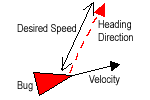
- this desire causes the bug to head in the direction specified by 'Heading Direction' at 'Desired Speed'
- if 'Heading Direction' equals nullVector, bug will move in current direction it is heading (defined by velocity) at 'Desired Speed'
-produces zero result if 'Desired Speed' = 0Point Seek
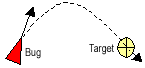
- seek desire causes the bug to align its orientation towards the specified target
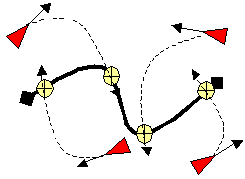
- if a bug continues to seek, it will pass through the target, then turn back to seek it again
- produces zero result if 'Desired Speed'=0 or target not in field of viewPoint Moth Seek
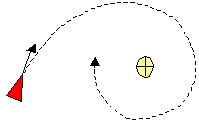
- moth seek desire is the same as seek, except that the bug is moving in orbital paths around the target, much like a moth buzzing around a light bulb
- produces zero result if 'Desired Speed'=0 or target not in field of viewPoint Arrival
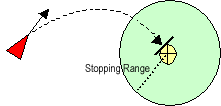
- arrival is identical to seek behaviour when the bug is far away from the target, but if the target is in a predefined distance (Stopping Radius), the bug will try to slow down and eventually stop at the target
- produces zero result if 'Desired Speed'=0 or target not in field of viewCurve Seek
- same steering desire as Point Seek, except targets are distributed on one or multiple 'Input Curves' (or you can use curve knots as targets, too)
- produces zero result if 'Desired Speed'=0 or target not in field of view (note, it is possible the curve is in field of view, but bug won't seek, because its specific target on the curve is not in field of view!)Curve Moth Seek
- same as 'Point Moth Seek', take a look at 'Curve Seek' and you'll get the idea how it works
- produces zero result if 'Desired Speed'=0 or target not in field of viewCurve Arrival
- same as 'Point Arrival', take a look at 'Curve Seek' and you'll get the idea how it works
- produces zero result if 'Desired Speed'=0 or target not in field of viewCurve Following
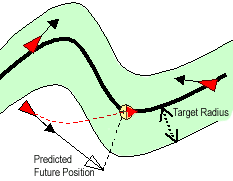
- bug estimates its future position on its current heading, then seeks the closest point on the curve to this future position
- 'Sensor Range' serves as scaling factor for the current velocity to calculate the future position
- bugs do (currently) follow the curve in no predefined direction
- field of view is currently not available with this steering desire
- produces zero result if bug inside space defined by 'Target Radius'Surface Seek
- same steering desire as Point Seek, except that targets are distributed on one or multiple 'Input Surfaces' (or you can use surface knots as targets, too)
- produces zero result if 'Desired Speed'=0 or target not in field of view (note, it is possible the curve is in field of view, but bug won't seek, because its specific target on the curve is not in field of view!)Surface Moth Seek
- produces zero result if 'Desired Speed'=0 or target not in field of viewSurface Arrival
- produces zero result if 'Desired Speed'=0 or target not in field of viewSurface Following
- same steering desire as 'Curve Following' except the curve is a surface
- produces zero result if bug inside space defined by 'Target Radius'Neighbor Alignment
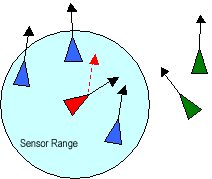
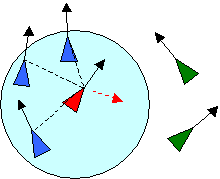
- alignment steering desire forces the bug to align itself with the bugs in its viewing range
- it will head in the same direction and try to adjust to the speed of the bugs nearby
- produces zero result if no other bugs in field of viewNeighbor Cohesion
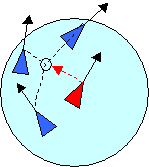
- Bugs with this desire will try to approach and form a group with other nearby bugs by heading for the average position of these bugs
- produces zero result if no other bugs in field of viewNeighbor Separation
- this steering desire can be used to prevent bugs vom crowding together, it forces the character to steer away from the other bugs nearby
- this produces good results when the bugs are aligned or the weight is relativly low regarding the maximum self applied force
- produces zero result if no other bugs in field of viewMaximum Force double - in behavioural animation forces are self applied and hence limited, maximum force defines how much force a bug can apply for the specific steering desire
Inverse Desired Steering Force bool - if active, desired steering force is scaled with '-1', that means, e.g. seek will become flee Desired Speed double - active if steering desire is target based
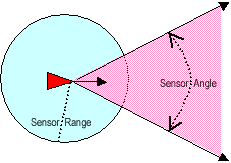
- speed at which bug wants to reach targetField Of View Attributes Use Sensor Range bool - check whether to use Sensor Range or not Sensor Range double - active if Use Sensor Range is checked
- defines a distance at which bugs can sense other bugs or targets, think of a sphere with radius Sensor Range around the position of the bugUse Sensor Angle bool - check whether to use Sensor Angle or not Sensor Angle angle - active if Use Sensor Angle is checked
- defines an angle around the heading vector of the bug in which it can sense bugs or targets, think of a cone which top is located at the position of the bugBug Attributes Heading Direction vector - the direction in which the bug will head, when using 'bug direction heading' steering desire
- just the direction will be used and not the length of the vector (so <<1.0;0.0;0.0>> equals <<3.0;0.0;0.0>>)Target Attributes Input Point vector - vector array attribute, connect all target points here
- be sure to provide world positions only! (this will be the case, if you use 'bbConnect')AC Input Curve nurbs
Curve- array attribute, connect all nurbsCurves here
- be sure to provide curves in world space only! (this will be the case, if you use 'bbConnect')AC Input Surface nurbs
Surface- array attribute, connect all nurbsSurfaces here
- be sure to provide surfaces in world space only! (this will be the case, if you use 'bbConnect')AC Stopping Range double - active if steering desire is arrival
- predefined distance at which the bug will try to slow down and stop at the targetKSC Target Radius double - active if steering desire is following
- defines area around curve / surface in which a bug thinks it is following the path and does not change its directionSub Targets enum Uniform
- targets are placed equidistant on curve or surface
- if you experience, that targets are not uniformly placed on the specific geometry, then try to 'Rebuild Curve / Surface' and be sure to check radiobutton 'uniform'
- if 'Input Selection' is 'All Connected' targets will be distributed on connected curves / surfaces with respect to the different curve lengths / surface areasKnots
- all knots of curve / surface will be used as targetsInput Selection enum Index
- use point / curve / surface at steering desire specific array index ('Input Index')
All connected
- use all points / curves / surfaces connected to steering desire specific inputInput Index short - specifies which input point / curve / surface is to be used, provide the index the desired geometry is attached to the respective array attribute Tolerance double - the amount of error (epsilon value) in the calculation, this is used when calculating points / distances to nurbs curves and surfaces
Combination Attributes Priority short - priority steering desire has if combined with other desires Weight short - weight steering desire has if combined with other desires Input / Output Attributes Input Data comp - input data from particle nodes, contains positions / velocities / masses etc. of all bugs Output Force vector - the desired steering forces, calculated by the node AC