| steering desires - target desires |
- target desires need targets to work, this can be any type of geometry (except
subdivision surfaces)
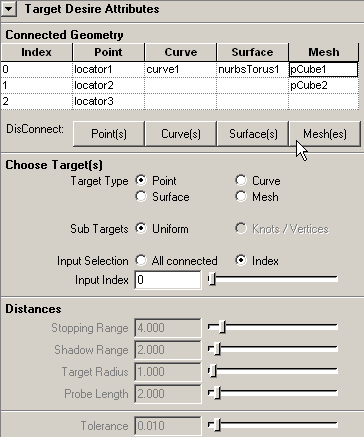
- connect geometry to the steering desire node using the Connection Editor you
can call with the buttons in the Attribute Editor
- note if you choose to use field of view, this will be only used for bug <->
assigned target point (does not need to be the whole geometry!) relations
| Target Desire Attributes | ||
| Target Type | enum | "point", "curve", "surface",
"mesh" - items only active if matching geometry is connected |
| Sub Targets | enum |
"uniform" "knots / vertices" |
| Input Selection | enum | "index" - only one geometry (defined by "input index") will be used for computation "all connected" - use all geometry connected to steering desire for computation |
| Input Index | short | - specifies which input geometry is to be used, provide the index at which the desired geometry is attached to the respective array attribute |
| Tolerance | double | - the amount of error (epsilon value) in the calculation, this is used when calculating points / distances to nurbs curves and surfaces |
| seek |
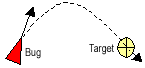
- seek desire causes the bug to align its orientation towards the specified
target
- if a bug continues to seek, it will pass through the target, then turn back
to seek it again
- produces zero result if 'Desired Speed'=0 or target not in field of view
| moth seek |
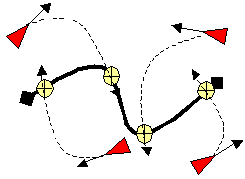
- moth seek desire is the same as seek, except that the bug is moving in orbital
paths around the target, much like a moth buzzing around a light bulb
- produces zero result if 'Desired Speed'=0 or target not in field of view
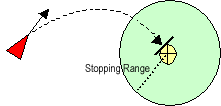
| arrival |
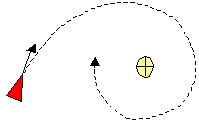
- arrival is identical to seek behaviour when the bug is far away from the
target, but if the target is in a predefined distance (Stopping Radius), the
bug will try to slow down and eventually stop at the target
- produces zero result if 'Desired Speed'=0 or target not in field of view
| Arrival Attributes | ||
| Stopping Range | double | - active if steering desire is arrival - predefined distance at which the bug will try to slow down and stop at the target |
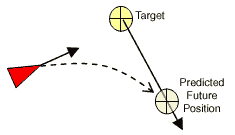
| pursuit |
- pursuit is identical to seek behaviour except the bug tries to predict where
its target is moving and tries to intercept the targtes path
- this will only produce visible result, if the target is moving
| shadow |
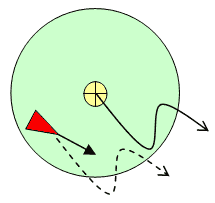
- shadow is identical to seek behaviour when the bug is far away from the target,
but if the target is in a predefined distance (Shadow Range), the bug will try
mimic the movement of the target
- produces zero result if 'Desired Speed'=0 or target not in field of view
| Shadow Attributes | ||
| Shadow Range | double | - active if steering desire is shadow - predefined distance at which the bug will try to mimic the movement of the target |
| follow |
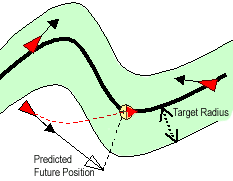
- bug estimates its future position on its current heading, then seeks the
closest point on the curve / surface / mesh to this future position
- 'Probe Length' serves as scaling factor for the current velocity to calculate
the future position
- bugs do (currently) follow the curve in no predefined direction
- field of view is currently not available with this steering desire
- produces zero result if bug inside space defined by 'Target Radius'
| Follow Attributes | ||
| Target Radius | double | - active if steering desire is following - defines area around curve / surface in which a bug thinks it is following the path and does not change its direction |
| Probe Length | double | - scaling factor for the current velocity to calculate the future position |
| Tolerance | double | - defines the maximum error used in the calculation, the bigger the value, the faster the computation |
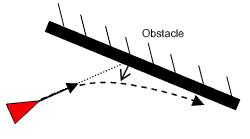
| obstacle avoidance |
- obstacle avoidance prevents the bugs from bumping into obstacles (which can
be any mesh or nurbs surface)
- every bug has got a probe of a specified length attached at its front, if
this probe touches one of the specified obstacles, then the bug will try to
steer away from this predicted collision point
- though you can use nurbsSurfaces as obstacles, it is recommended to use meshes
as the collision point calculation can be performed much faster with this type
of geometry
| Follow Attributes | ||
| Probe Length | double | - probe length to check for obstacles |
| Tolerance | double | - defines the maximum error used in the calculation, the bigger the value, the faster the computation |