| steering desires - bug desires |
| head direction |
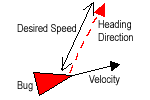
- this desire causes the bug to head in the direction specified by 'Heading
Direction' at 'Desired Speed'
- if 'Heading Direction' equals nullVector, bug will move in current direction
it is heading (defined by velocity) at 'Desired Speed'
- produces zero result if 'Desired Speed' = 0
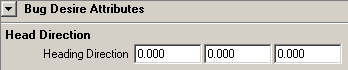
| Head Direction Attributes | ||
| Heading Direction | vector | - heading vector of the bug - just the direction will be used and not the length of the vector (so <<1.0;0.0;0.0>> equals <<3.0;0.0;0.0>>) |
| wander |
- a useful desire for adding a little randomness to a bug's motion (or a lot)
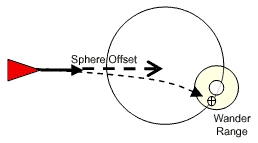
- consider a sphere projected in front of the bug, initially the bug will move
to the point on the sphere which is most far away, with each simulation step
a small random vector will be added to this, reprojected back to the sphere,
this resulting point on the sphere will be seeked now
- the bigger the wander sphere radius, the more the bug will turn
- a bigger wander range will make the bug "turn happier"
- if you offset the sphere to the left or the right, you will force the bugs
to do spins in that direction
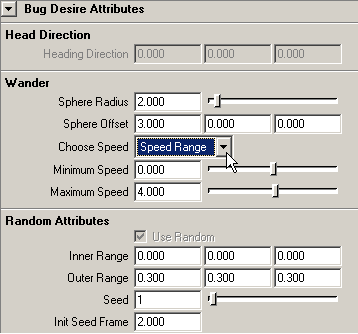
| Wander Attributes | ||
| Sphere Radius | double | - defines the radius of the wander sphere, this controls the range of possible turning angles (a small circle gives you relatively straight wandering, a big circle gives you more turning) |
| Sphere Offset | vector | - defines the wander spheres position relative
to the bugs position and heading direction (as described by its velocity) - the relative position of the sphere allows you to control whether or not you generate backward facing vectors for amoeba like spins or bias steering to one side for spiralling effects and the size of the random vector controls the randomness of your wandering path |
| Choose Speed | enum | "Desired Speed" - the bug will try to move at the "Desired Speed" defined by "General Bug Attributes" "Speed Range" - the bug's speed will depend on the current position of the random point on the wander sphere: when it is the most far away from the bug it will go at "Maximum Speed", when it is the most near at "Minimum Speed", for positions between, speed will be determined linear |
| Minimum Speed | double | - active if "Choose Speed" is "Speed
Range" - the bugs speed when the random pos on the wander sphere is nearest ( length(Sphere Offset) - Sphere Radius ) |
| Maximum Speed | double | - active if "Choose Speed" is "Speed
Range" - the bugs speed when the random pos on the wander sphere is most far ( length(Sphere Offset) + Sphere Radius ) |
| Random Attributes | ||
| Use Random | bool | [not implemeted yet] |
| Inner Range | vector | - the inner range used to determine the random
vector - the size of the random vector controls the randomness of your wandering path - values for the random vector will be: (-outerRange <= randomVector <= -innerRange) and (+innerRange <= randomVector <= +outerRange) |
| Outer Range | vector | - the outer range used to determine the random vector |
| Seed | double | - seed value for pseudo random number generation for wander random vector determination |
| Init Seed Frame | double |
- frame at which pseudo random number generator will be initialized |